ContentPosts from @alfaro19918957..
Story ManageEngine Team
@angie shared a post, 1 year, 5 months ago
Product Marketing Analyst, manageengine

Distributed tracing: Bringing clarity to complex transactions

Applications Manager

Distributed tracing is a powerful technique for understanding and debugging complex, distributed applications. It works by tracking a single user request as it travels across various microservices and functions within your system. Learn more...

Story
@adammetis shared a post, 1 year, 5 months ago
DevRel, Metis

Imagine a world where you don't have to worry about your database…

Imagine a world where you don’t have to worry about your database, no bugs are deployed to production, all the performance checks happen early during the development phase, you don’t need DBAs nor the maintenance team, and still, everything works great. No matter how fantastic that sounds, you can get it today. Read on to learn how.

ImagineAWorld
Story
@laura_garcia shared a post, 1 year, 5 months ago
Software Developer, RELIANOID

Success of our Early Adopters program

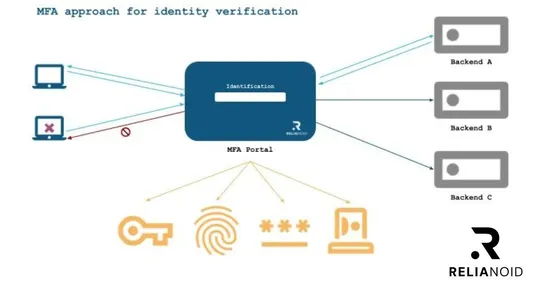
🌟 Exciting News! 🌟 Our Early Adopters' Program is successfully ongoing! 🚀 The feedback we've been receiving has been nothing short of phenomenal, particularly regarding our MFA properties. They have highlighted the enhanced security, seamless integration, and user-friendly experience as standout fea..

ssnn_MFA-for-identity-verification-1_RELIANOID
Story
@dzenanakajtazcs shared a post, 1 year, 5 months ago
Technical Content Writer, Mailtrap

How to Send Emails With Google App Script

If you’re a beginner like me and have spent hours unsuccessfully searching for the right piece of content or GitHub page that covers how to use Google App Script to send email, you’re in the right place!

In this article, I will take you step by step through the process of sending emails via Google Scripts.

So hold tight; we’re in for a ride!

email sending
Link
@hemendranahar shared a link, 1 year, 5 months ago

Auto-Complete Suggestions Using OpenSearch

This blog post will walk you through the create an feature in the application that can help your users to save time to find anything. I've tried to make this simple so that everyone can see through this.

Auto-Complete Suggestions Using OpenSearch
Story
@squadcast shared a post, 1 year, 5 months ago

Incident Alert Management: Why Squadcast is an All-in-One Solution

This blog post argues that managing incident alerts with separate tools can be inefficient and proposes Squadcast as an all-in-one solution. Squadcast offers features like:

Incident creation and collaboration tools

Actionable notifications and incident management

Integrations with monitoring tools and chat platforms

The blog post also highlights benefits of using Squadcast such as reduced alert fatigue, improved collaboration, and cost-effectiveness.

Story
@squadcast shared a post, 1 year, 5 months ago

Incident Response Tool: How a Non-Profit Streamlined Their Process

This blog post explores how Matsuri Japon, a Canadian non-profit, tackled IT alert management challenges with an incident response tool. The tool helped them streamline their process by:

Reducing Alert Fatigue: Filtering out non-critical alerts.

Improving Stakeholder Communication: Keeping stakeholders informed during outages.

Enhancing Response Efficiency: Categorizing and directing alerts to the most suitable responders.

Enabling Data-Driven Decisions: Providing insights to optimize IT infrastructure.

Matsuri Japon's success story highlights the value of incident response tools for non-profits seeking to improve IT operations and communication.

Story
@squadcast shared a post, 1 year, 5 months ago

The Ultimate Guide to Modern Incident Response Platforms for Enhanced Efficiency and Reduced Costs

This blog post talks about the importance of Incident Management and how a modern incident response platform can streamline the process. It highlights the challenges of IT tool sprawl and how a modern platform can help consolidate functionalities, integrate seamlessly with other tools, and standardize workflows. The blog also details the different parts of a powerful tech stack for Incident Management and talks about best practices to get the most out of your tools. Finally, it concludes by emphasizing the benefits of using a modern incident response platform.

Story
@squadcast shared a post, 1 year, 5 months ago

How Squadcast Helped Researchable Reduce Alert Fatigue and Establish a Single Source of Truth for Incident Management

This blog post details how Researchable, a software development company, used Squadcast, an incident alerting platform, to enhance their incident management process. By using features like alert suppression, Researchable reduced the volume of unimportant alerts, allowing them to focus on critical incidents and improve their Mean Time To Resolution (MTTR).

Story
@squadcast shared a post, 1 year, 5 months ago

AlertOps vs PagerDuty: In-Depth Comparison for Incident Monitoring Needs

This blog post compares two popular incident monitoring tools: AlertOps and PagerDuty. It explains how each tool can help businesses identify and resolve IT issues quickly. Here's a quick summary:

AlertOps is ideal for complex organizations like MSPs and large enterprises. It offers features like customizable scheduling, on-call management, and strong communication tools during incidents.

PagerDuty caters to a wider audience, including DevOps teams and customer support. It focuses on proactive incident management with features like machine learning and automation.

Ultimately, the best choice depends on your specific needs. If you have a complex IT environment, AlertOps might be a better fit. If you prioritize automation and a broader range of integrations, PagerDuty could be the way to go. The blog also mentions Squadcast as an alternative platform offering a unified approach to on-call and incident response workflows.