In this blog post, Anthony Bushong discusses five features in Google Kubernetes Engine (GKE) that can be used to optimize Kubernetes clusters.
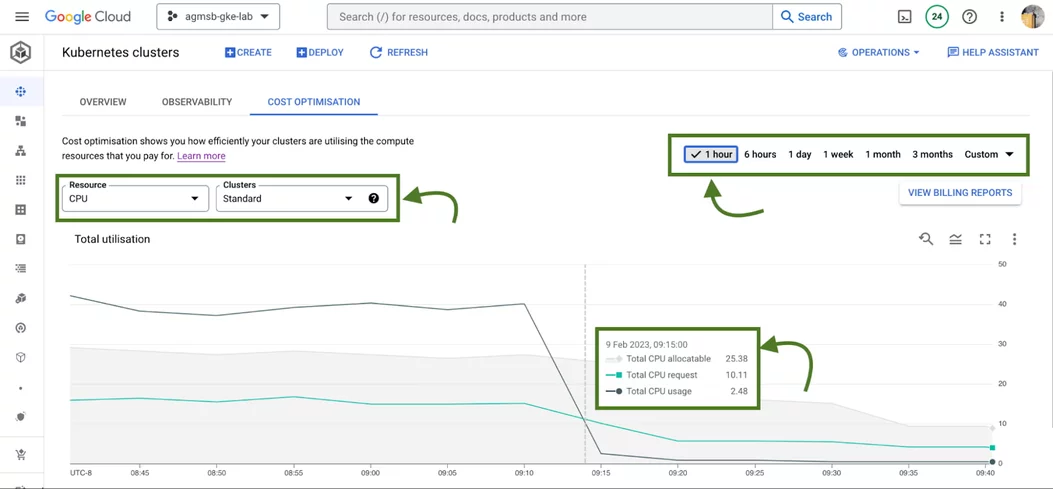
The first feature is the cluster-level cost optimization tab, which provides a time series visualization for CPU and memory usage across all clusters.
The second feature is GKE cost allocation, which integrates workload usage with Cloud Billing reports, allowing users to see billing on a per-Kubernetes namespace or per-Kubernetes label level.
The third feature is the cost optimization tab at the workload level, which provides bar charts to represent usage, requests, and limits. The fourth feature is recommendations for adjusting workload requests based on historical usage data.
The fifth feature is the setup guide for creating an opinionated GKE standard cluster with GKE cost allocation and Vertical Pod Autoscaler enabled and a cost estimation panel that shows an estimated monthly cost.
Tips: These features can be used by cluster administrators, workload owners, and billing managers to optimize the use of resources in GKE clusters.


Give a Pawfive to this post!
Share with your friends and followers
Start writing about what excites you in tech — connect with developers, grow your voice, and get rewarded.
Join other developers and claim your FAUN.dev() account now!