How to Use the Template Step-by-Step
The Vendor Payment Template is designed for finance teams, accountants, and business owners who want a consistent way to manage invoice payments in Jira and not get lost in spreadsheets or approval delays.
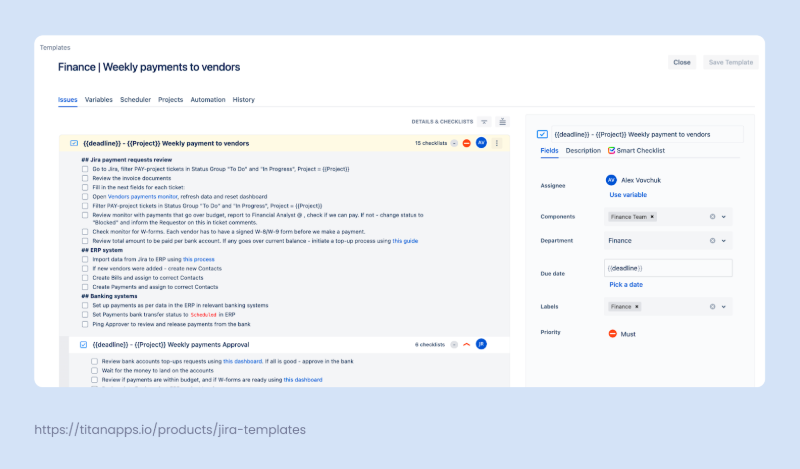
Before, the first step is to install Smart Tools by TitanApps. Smart Checklist & Smart Templates allow you to replicate a consistent structure for every payment with one click, eliminating the need to start from scratch each time.
Here’s how it works in practice:
1.Submit the Payment Request
A team member (reporter) initiates the process via Jira usually by filling out a simple form through Jira Service Management. This info is transferred from JSM request to the description field:
- Vendor name and contact info
- Invoice number and amount
- Due date and payment terms
- Preferred payment method (ACH, wire transfer, card, etc.)
- Linked purchase order or contract (if applicable)
This eliminates the need for manual data entry and sets the stage for clean processing.
2. Validate the Information
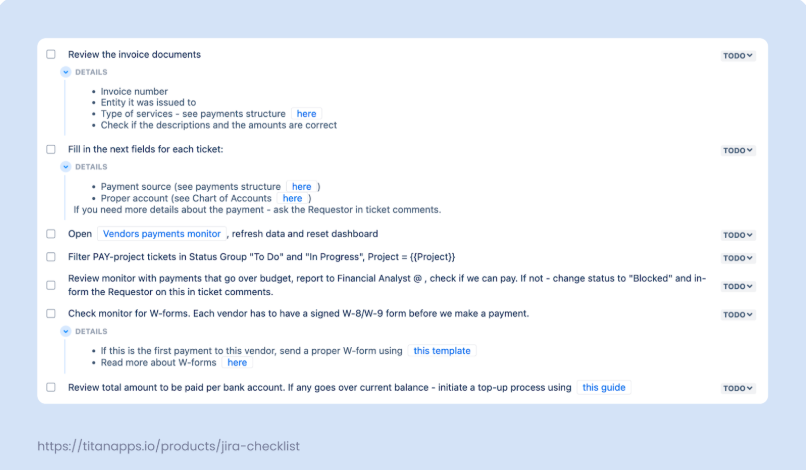
Once created, the Jira issue includes a Smart Checklist with validation steps. The assigned accountant reviews:
- Invoice accuracy
- Vendor details and tax forms (W-8/W-9, if needed)
- Budget category and account
- Attached documentation and payment source
This stage ensures all information is complete before the payment moves forward. To make this work you can prevent the Jira work item from transitioning to the next state if some mandatory checklist items remain unchecked/uncompleted. Learn more about validation of the mandatory items.
3. Approval Workflow
The issue is automatically routed to the designated approver, usually a finance lead or manager. They confirm that the payment meets company policy and sign off directly in Jira by updating the checklist item or issue status.
Built-in clarity means fewer questions, less Slack pinging, and better alignment with procurement and budget holders.
4. Process the Payment
Once approved, the payment can be executed using your preferred payment system (e.g., bank portal, ERP, or accounting software). You can attach confirmation (e.g., bank receipt or transaction ID) to the issue and mark it as complete in the checklist.
5. Reconcile and Close
Finally, the accountant logs the payment in your financial system and updates the issue status to “Done.” Because everything is captured inside Jira, you maintain an auditable trail for future reference or reporting.
Benefits of Using This Template
Finance teams often juggle late payments, missing details, and unclear responsibilities. With the Vendor Payment Template, these issues become manageable and in many cases, disappear altogether.
Here’s how this template helps your accounts payable team work faster, with fewer errors:
Fewer Delays, No Missed Due Dates
The checklist ensures timely payments by tracking every step from invoice submission to reconciliation. With the Smart Templates scheduler feature, tasks are created on time, every week, without reminders or manual setup.
Clear Responsibilities
Each stage from invoice validation to final payment comes with an assigned checklist item. Everyone knows who does what and when. No more “who’s handling this?” Slack messages.
Built-in Compliance Checks
The template includes checklist items and instructions for collecting W-8/W-9 forms, verifying tax documentation, and confirming the correct payment method (ACH, card, or wire transfer). This reduces compliance risk and ensures clean audit trails.
Repeatable Across Teams and Projects
With dynamic variables like {{project}}, this template can be reused across departments or locations. Whether it’s recurring payments, vendor onboarding, or budget-specific reviews, the process stays consistent.
Better Visibility into the Payable Process
Jira becomes the central source of truth for vendor payment management. At any point, team members can see the status of a payment, who approved it, and what steps remain.
Real-World Results
At Railsware, switching to this template helped reduce payment processing time by 27%. You can read more in the full case study here:
Vendor Payments Optimization: Transforming Financial Operations with Smart Tools
Automate Weekly Vendor Payments with Smart Templates Scheduler
One of the biggest wins of this workflow is that you don’t have to remember to do it every week.
With the scheduler built into Smart Templates for Jira, you can fully automate the creation of vendor payment issues, so that your accounts payable process kicks off automatically, every Friday (or any day you choose).
Here’s how it works:
Set It and Forget It
Configure the Smart Templates built-in scheduler to create a new issue each week based on the Vendor Payments Template. It’s perfect for recurring payment cycles where timing and consistency are critical. In this case we don’t use JSM and this is another workflow that can be managed with the same template.
Once the schedule is active, a fresh issue is created automatically, complete with:
- Pre-filled fields for vendor payment processing
- Smart Checklist with all steps (submission ? reconciliation)
- Embedded instructions and documentation links
- Clear deadlines and dynamic field content
This helps finance teams stay precise without having to manually edit every issue. It also guarantees full alignment with internal policies or payment term variations across vendors.
The result: no missed payments, no last-minute scrambling, and a structured process that runs like clockwork.
Vendor Payment Template: FAQ
Still unsure if this template fits your finance workflow? Here are answers to some of the most common questions we get from teams setting up vendor payment management in Jira.
Can this template handle different payment methods like ACH, credit card, and wire transfers?
Yes. The Smart Checklist allows you to define different paths for each payment method, including ACH payments, virtual cards, or wire transfers. You can also link to internal policies or instructions within checklist items to make sure each method is processed correctly.
How do I track payment approvals across multiple teams?
You can assign checklist items or Jira issue approvals to different users (e.g., accountant, CFO, project lead). This ensures that approval workflows are centralized in one issue and remain visible throughout the process.
What if vendor invoices arrive via email or from different tools?
You can set up a Jira Service Management form for vendor onboarding or invoice submissions. Once a request is submitted, the Smart Template kicks in and standardizes the flow. This helps you centralize requests, reduce back-and-forth, and avoid invoice loss.
Can this template integrate with our ERP or accounting software?
While the template itself lives in Jira, teams often use checklist items to log payment confirmations or attach export data synced from ERP platforms. You can also link to records in your accounting software (e.g., QuickBooks, Xero) or create Jira automation rules to support further integration.
Can I use this for international vendors with different payment terms?
Absolutely. The template can be duplicated and adjusted per region, currency, or project. You can also use variables like {{payment_terms}} to reflect different due dates or contract conditions for each vendor.
If you’re ready to take control of your accounts payable process, reduce delays, and eliminate manual entry errors, give the Vendor Payment Template a try.
I hope you enjoyed reading this article about the vendor payment template originally published on TitanApps blog.