Join us

Contract Review Template for the Legal Team: a Free Checklist

Zrzut ekranu 2026-05-01 103840

TL;DR:

Whether you’re reviewing a routine non-disclosure agreement or a complex commercial contract, your team likely follows roughly the same steps. Although many legal professionals don’t require a predefined plan, in some cases, having a contract review template is very helpful. 

For example, if you have a large legal department, work in a legal firm with numerous clients, or need to scale best practices, in all these cases, process standardization is essential. A contract review template enables you to document all the crucial steps, ensuring that your processes are robust and repeatable.

In this guide, we’ll share a free contract review template for legal teams. We also explain how to use it in Jira or Monday and how to add it to your tasks automatically.


What is a Contract Review Template and What Should it Look Like?

A contract review template is a structured checklist that outlines the essential review steps that must be completed. It helps legal teams keep track of every detail and adhere to the guidelines accepted within their organization.

Most often, such a template is needed for recurring tasks – for instance, reviewing service agreements with vendors. However, it can also be used for contracts that seldom land on your desk. In such cases, a contract review template can include additional guidance on how to handle these situations. This makes knowledge transfer easier and helps you with onboarding new team members and scaling processes.

If you work in a large organization that uses boilerplate contract templates, this checklist can specify terms that can/cannot be altered during the contract negotiation. For teams reviewing high volumes of agreements, dedicated AI contract review softwarecan automate much of this process, flagging non-standard clauses, tracking obligations, and routing contracts for approval without manual follow-up.

A Free Contract Review Template Checklist by Titan Apps

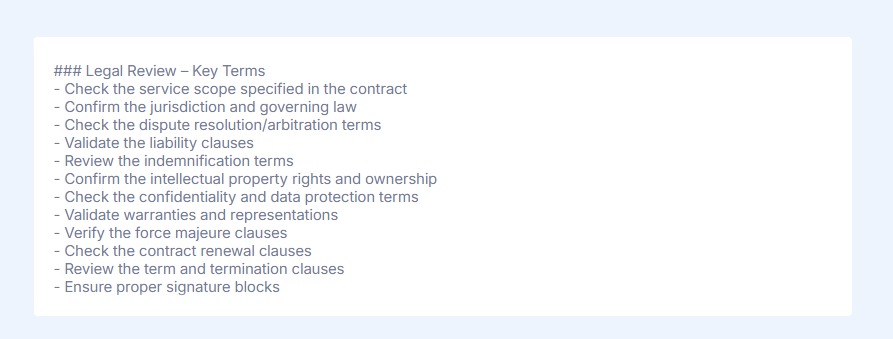
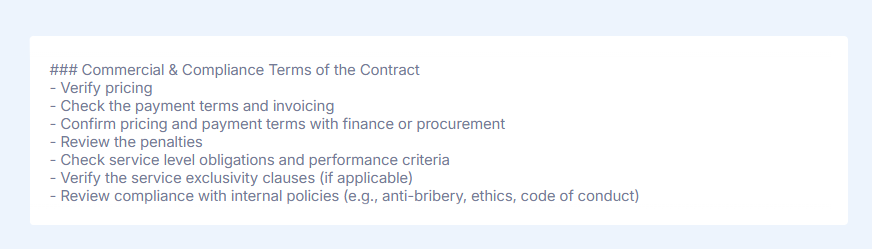
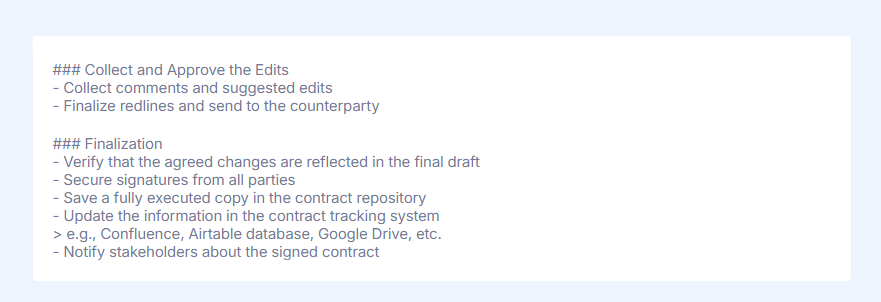
Here’s a hands-on checklist template prepared by Titan Apps’ legal team. This template reflects the main review stages for the most common type of contract – Service Agreement. 

This checklist is easily customizable so that you can adjust it to your organization’s workflow. It can also serve as a base for checklists for other contract types, such as NDAs, Data processing agreements, and Purchase agreements, among others.
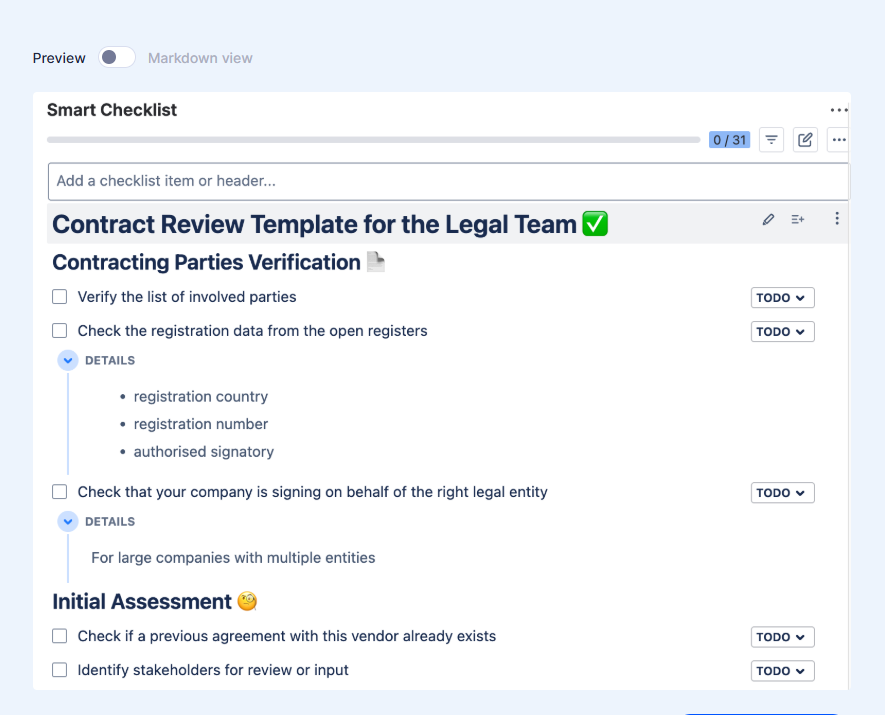
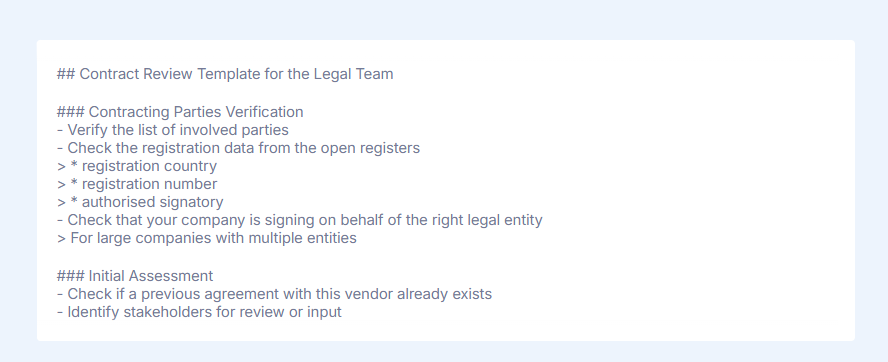
For your convenience, here’s the same checklist, now divided into sections based on the review stage:

How to Use a Contract Review Template Checklist in Jira

  1. Install Smart Checklist for Jira from the Atlassian Marketplace. If you are not working in Jira, you can also use it on Monday.com – in this case, install Smart Checklist for Monday.
  2. Copy the contract review template checklist we shared earlier and paste it into the Smart Checklist section of your Jira issue (Jira work item).
  3. Customize the template (optional). You can add new sections, rearrange steps, structure the checklist with headers, tag responsible people and stakeholders, add due dates, and more. Smart Checklist also allows you to set custom statuses for checklist items or mark selected steps as mandatory.
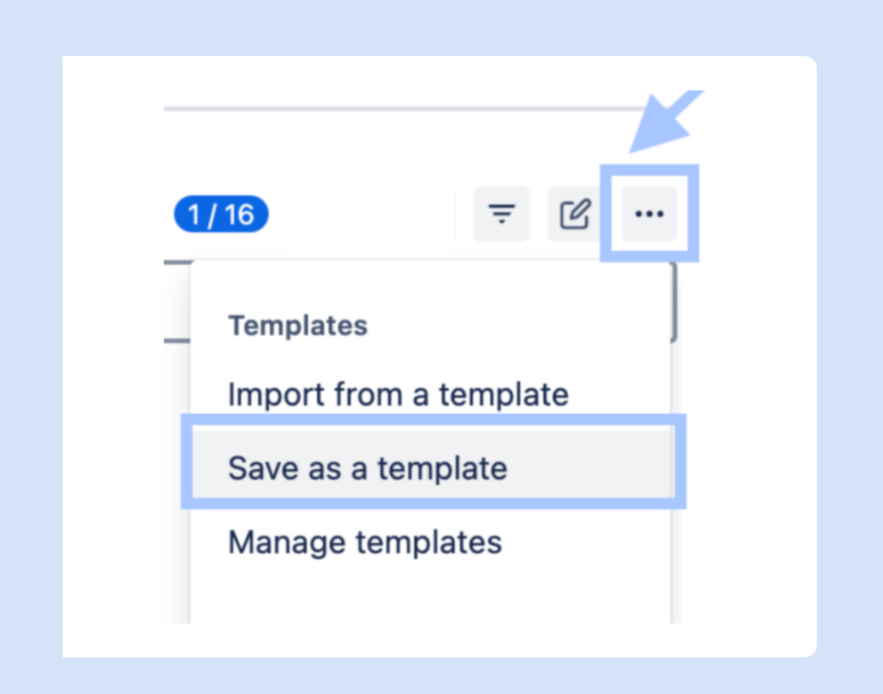
  4. Save the checklist as a template. Open the Smart Checklist menu (as shown below) and select “Save as a template”. 

For more details, please refer to the video guide below:

How to Automatically Add a Contract Review Checklist to Work Items

If you routinely review a large number of legal agreements and organize this work in Jira, you can auto-add your contract review template checklist to your Jira tasks.

This minimizes the task creation time and promotes consistency, which is especially important for a large team. With the contract review checklist added automatically, you can ensure no one forgets about it and everyone has a clear step-by-step plan included in every review task.

To set up this automation, go to a Jira work item with a smart checklist, click the three-dot menu in the upper-right corner, and select Manage Templates. Then, find the checklist you need in the list and expand it. Next, select the types of work items to which you want to automatically add this contract review template checklist. 

Depending on your workflow, it can be useful to first create a dedicated work type for this.

Why Set Up a Contract Review Template With Smart Checklist?

  • Saving time – it allows you to avoid repetitive planning and optimize the contract review processes
  • Reduced compliance risks – all the necessary criteria can be included in the checklist
  • Process consistency – everyone follows the same steps and best practices
  • Faster onboarding and scaling – new employees can easily check what needs to be verified and who should be contacted
  • Improved visibility – stakeholders can see what stage each contract revision is currently in

Implement Checklist Templates For Other Tasks

In this blog post, we provided you with a free contract review template checklist and explained how to use it in Jira. Implementing this template allows you to save valuable resources, ensure high standards, and address potential risks.

In addition to contract management, Smart Checklist can help you streamline many other processes, such as:

By utilizing checklist templates across different tasks, you can create more organized and efficient workflows. To push this a step further and maximize business value, consider using other Smart Tools by Titan Apps.

If you're enjoying this article, want to learn more, and get the contract review template in markdown format, see the original article written by Olga Cheban for the TitanApps blog.


Let's keep in touch!

Stay updated with my latest posts and news. I share insights, updates, and exclusive content.

Unsubscribe anytime. By subscribing, you share your email with @viktoriiagolovtseva and accept our Terms & Privacy.

Give a Pawfive to this post!


Only registered users can post comments. Please, login or signup.

Start writing about what excites you in tech — connect with developers, grow your voice, and get rewarded.

Join other developers and claim your FAUN.dev() account now!

Avatar

Viktoriia Golovtseva

@viktoriiagolovtseva
Experienced Content Writer & Marketer, passionate about crafting strategic content that drives results and exploring the intersections of content and product marketing to create impactful campaigns.
Developer Influence
69

Influence

5k

Total Hits

34

Posts