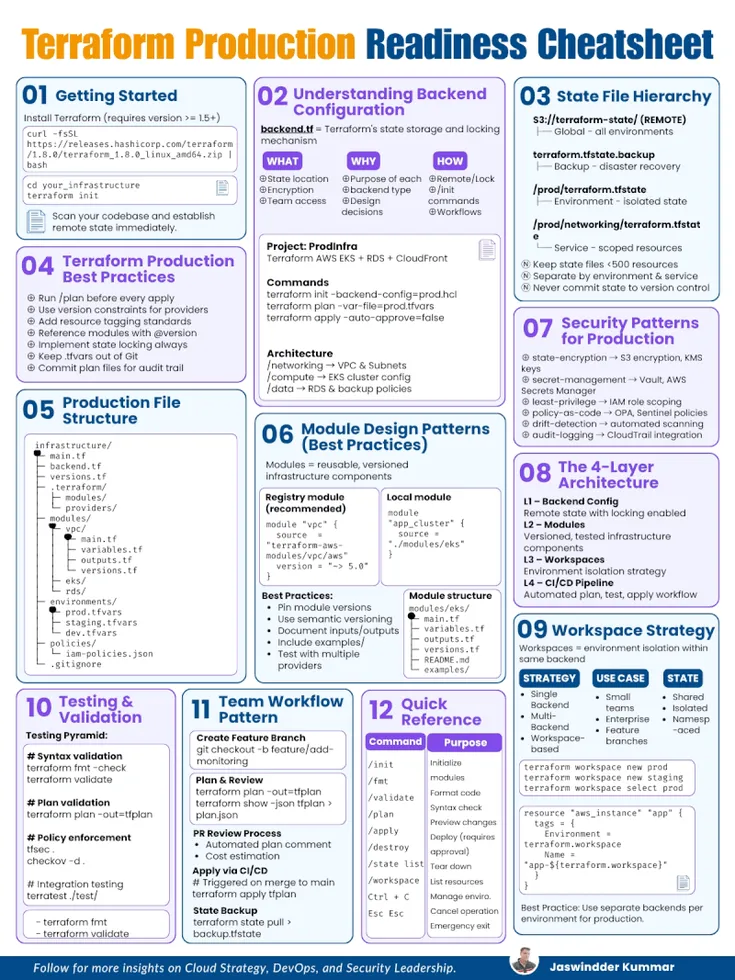
Most Terraform projects work perfectly in development… until they meet production.
That’s where things break:
- State conflicts
- Uncontrolled changes
- Security gaps
- Untraceable deployments
This guide is the bridge between “it runs” and “it’s production-ready.”
1. Getting Started
Production readiness begins with discipline from day one.
- Use Terraform version >= 1.5+
- Initialize your project:
terraform init - Never use local state in production
👉 Set up remote state immediately.
Local state works for experimentation. In production, it’s a liability.
2. Understanding Backend Configuration
Your backend is the source of truth for infrastructure.
A typical backend.tf defines:
- Where state is stored
- How it is locked
- Who can access it
Example (S3 Backend)
terraform {
 backend "s3" {
 bucket = "terraform-state"
 key = "prod/networking/terraform.tfstate"
 region = "ap-south-1"
 encrypt = true
 dynamodb_table = "terraform-locks"
 }
}
Key Concepts
- State storage → centralized and durable
- State locking → prevents concurrent modifications
- Encryption → protects sensitive data
Without this, you are one apply away from chaos.
3. State File Hierarchy
A scalable Terraform setup treats state like a filesystem hierarchy.
s3://terraform-state/
 ├── prod/
 │ ├── terraform.tfstate
 │ ├── networking/terraform.tfstate
 │ ├── compute/terraform.tfstate
 ├── staging/
 ├── dev/
Best Practices
- Keep each state file < 500 resources
- Split by:
- Environment (prod, staging, dev)
- Service (networking, compute, database)
- Never commit
.tfstateto Git
👉 Smaller states = faster plans + safer changes
4. Terraform Production Best Practices
These are non-negotiable in production:
- Always run:
terraform plan
beforeapply - Use version constraints:
required_providers { aws = { source = "hashicorp/aws" version = "~> 5.0" } } - Enforce tagging standards
- Version your modules:
source = "git::https://repo.git//vpc?ref=v1.2.0" - Enable state locking
- Keep
.tfvarsout of Git - Store and review plan outputs for auditability
👉 Production Terraform is about predictability, not speed
5. Production File Structure
A clean structure reduces cognitive load and errors.
infrastructure/
 ├── main.tf
 ├── backend.tf
 ├── versions.tf
modules/
 ├── vpc/
 ├── rds/
environments/
 ├── prod.tfvars
 ├── staging.tfvars
 ├── dev.tfvars
policies/
 ├── iam-policies.json
Why This Works
- Separation of concerns
- Reusability via modules
- Clear environment configuration
6. Security Patterns for Production
Security is where most Terraform setups fail silently.
Core Patterns
State Encryption
- Enable S3 encryption
- Use KMS keys
Secret Management
- Avoid hardcoding secrets
- Use external systems (Vault, Secrets Manager)
Least Privilege
- IAM roles scoped per service
- No wildcard permissions
Policy as Code
- Enforce guardrails using OPA or Sentinel
Drift Detection
- Detect manual changes outside Terraform
Audit Logging
- Enable CloudTrail or equivalent logging
👉 If your state is compromised, your infrastructure is compromised.
7. The 4-Layer Architecture
Production Terraform operates in layers:
Layer 1: Backend
- Remote state
- Locking enabled
Layer 2: Modules
- Reusable, versioned components
- Example: VPC, RDS, IAM
Layer 3: Workspaces / Environments
- Isolation strategy
- Prevents cross-environment impact
Layer 4: CI/CD Pipeline
- Automated workflows
- Enforced approvals
👉 This layered model brings control, scalability, and safety
8. Workspace Strategy
Workspaces allow environment isolation within the same backend.
terraform workspace new prod
terraform workspace select prod
Strategies
- Single Backend + Workspaces → simple setups
- Multi Backend → strict isolation (recommended for production)
- Hybrid → balance between both
👉 Workspaces are not security boundaries. Treat them carefully.
9. Testing & Validation
Before anything reaches production:
Syntax Validation
terraform fmt -check
terraform validate
Plan Validation
terraform plan -out=tfplan
Security Scanning
tfsec .
checkov -d .
Integration Testing
- Use Terratest for real infra validation
👉 If you skip validation, production becomes your test environment.