Software development has changed dramatically over the last few years. Teams are no longer shipping updates once every few months. Today, applications are updated continuously through Agile workflows, DevOps pipelines, and rapid deployment cycles.
While this speed helps businesses innovate faster, it also creates a major challenge: ensuring that every new deployment is stable enough to use.
A small bug introduced during deployment can break critical functionality within minutes. Imagine an eCommerce platform where users suddenly cannot complete payments after a new release. Or a banking application where customers fail to log in because authentication services stopped responding after deployment.
Even a tiny configuration mistake can impact thousands of users instantly.
This is exactly why smoke testing has become a critical part of modern software testing strategies.
Smoke testing acts as the first checkpoint after a new build or deployment. Instead of validating every feature deeply, it focuses on confirming that the application's most important functionalities are working correctly before deeper testing begins.
What Is Smoke Testing?
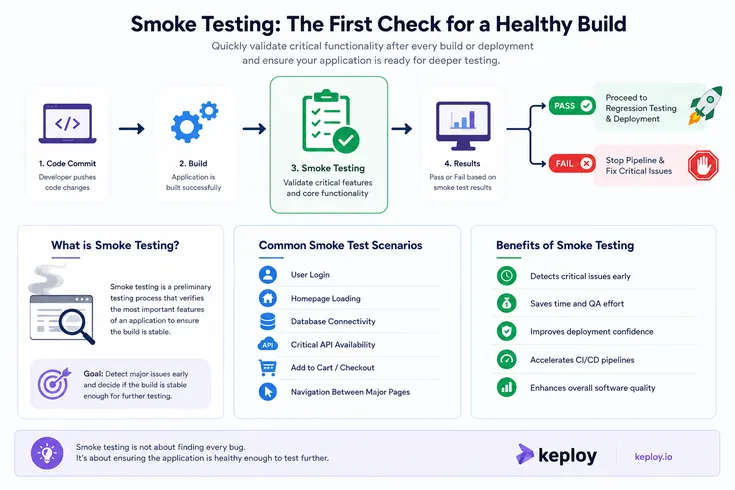
Smoke testing is a preliminary software testing method used to verify whether the core functionality of an application works properly after a new build.
The main purpose is to determine whether the build is stable enough for further testing.
Instead of checking every small feature, smoke testing validates only the critical workflows that keep the application functional.
Common Smoke Test Scenarios
Typical smoke tests include:
- User login functionality
- Homepage loading
- API response validation
- Database connectivity
- Navigation between major pages
- Checkout or payment flow
- File upload functionality
If any of these basic operations fail, the build is considered unstable and testing stops immediately.
Why Smoke Testing Matters
Early Detection of Critical Issues
One of the biggest advantages of smoke testing is identifying major failures early.
Without smoke testing, QA engineers may spend hours testing a build that is fundamentally broken. Developers may continue adding new features while deployment issues remain undetected.
Smoke testing prevents this by acting as an early warning system.
For example:
- If the login page crashes immediately after deployment
- If APIs stop responding
- If the application fails to connect to the database
The build can be rejected instantly before additional resources are wasted.
Saves Time and Testing Effort
Smoke testing reduces unnecessary testing cycles.
Instead of running complete regression suites on unstable builds, teams first verify whether the core application is functioning properly.
This helps:
- Reduce QA workload
- Improve productivity
- Minimize debugging time
- Accelerate release cycles
In fast-moving development environments, this time-saving advantage becomes extremely important.
Real-World Examples of Smoke Testing
Example 1: eCommerce Application
Imagine an online shopping platform deploying a new release before a festive sale.
The smoke test may validate:
- User login
- Product search
- Add-to-cart functionality
- Payment gateway access
If customers cannot add products to the cart, the deployment fails immediately and developers fix the issue before users are affected.
Example 2: Banking Application
In a banking application, smoke testing may verify:
- User authentication
- Account balance visibility
- Fund transfer initiation
- Transaction history loading
If users cannot access their accounts after deployment, the issue is identified instantly before deeper testing begins.
These examples show why smoke testing is often considered the first line of defense in software quality assurance.
Smoke Testing vs Regression Testing
Many teams confuse smoke testing with regression testing, but both serve different purposes.
Smoke TestingRegression TestingVerifies build stabilityVerifies existing functionalityCovers critical workflows onlyCovers complete application behaviorRuns quicklyTakes longer to executePerformed after deploymentsPerformed after code changesDetects major failuresDetects unintended side effects
Smoke testing ensures the build is usable, while regression testing ensures older functionality still works correctly after modifications.
Both are essential for maintaining software quality.
Manual vs Automated Smoke Testing
Smoke testing can be performed manually or through automation.
Manual Smoke Testing
Manual smoke testing works well for:
- Small applications
- Early-stage projects
- Quick exploratory checks
- Limited deployment frequency
However, as applications grow larger, manual testing becomes difficult to scale.
Automated Smoke Testing
Automation allows smoke tests to run automatically after every build or deployment.
Automated smoke testing offers several benefits:
- Faster execution
- Consistent results
- Reduced human effort
- Better CI/CD integration
- Immediate feedback for developers
This is why most modern DevOps teams prefer automated smoke testing workflows.
Smoke Testing in CI/CD Pipelines
Continuous Integration and Continuous Deployment rely heavily on rapid feedback loops.
Smoke testing fits perfectly into CI/CD environments because it validates deployment stability immediately after code changes are pushed.
How It Works in CI/CD
A typical workflow looks like this:
- Developer pushes code changes
- CI/CD pipeline builds the application
- Smoke tests run automatically
- Critical functionality gets validated
- Deployment proceeds only if smoke tests pass
This process helps prevent unstable builds from reaching staging or production environments.
As deployment frequency increases, smoke testing becomes even more important for maintaining release confidence.
Challenges Teams Face With Smoke Testing
Although smoke testing is extremely useful, teams often face several challenges while implementing it.
Maintaining Test Cases
Applications evolve continuously, which means smoke test scripts require frequent updates.
Slow Test Creation
Writing smoke tests manually for every API or workflow can take significant time.
Environment Instability
Sometimes tests fail due to staging environment issues rather than actual application bugs.
Scaling Across Microservices
Modern applications often include multiple services, APIs, and distributed systems, making smoke testing more complex.
To solve these challenges, many teams now rely on automated testing platforms.
How Keploy Simplifies Smoke Testing
Keploy helps developers automate smoke testing by generating test cases directly from real API traffic.
Instead of manually writing tests for every endpoint, Keploy records actual application interactions and converts them into reusable test cases automatically.
This approach offers several advantages:
Faster Test Generation
Teams can create smoke tests without spending hours writing scripts manually.
Realistic Test Coverage
Since tests are generated from real traffic, they reflect actual user behavior more accurately.
Easy CI/CD Integration
Keploy integrates smoothly into modern DevOps pipelines, allowing automated smoke tests to run after every deployment.
Reduced Maintenance Effort
Automatically generated tests reduce the burden of maintaining large testing suites manually.
For fast-moving engineering teams, this significantly improves testing efficiency and deployment confidence.
Best Practices for Effective Smoke Testing
To get the most value from smoke testing, teams should follow a few important practices.
Focus on Critical Workflows
Smoke tests should validate only the most important functionality.
Avoid testing every feature in detail.
Keep Tests Fast
Smoke testing should provide quick feedback. Long-running smoke tests reduce deployment speed.
Automate Wherever Possible
Automation improves consistency and helps integrate smoke testing into CI/CD pipelines.
Run Smoke Tests After Every Deployment
Every new build should go through smoke testing before further testing stages begin.
Monitor and Update Test Cases
As applications evolve, smoke test scenarios should be updated regularly to reflect new workflows.
Final Thoughts
In modern software development, speed without stability creates risk.
Frequent deployments, rapid releases, and continuous updates increase the chances of critical failures reaching users. Smoke testing helps prevent this by validating the health of the application immediately after deployment.
It acts as the first quality gate in the testing process, helping teams detect unstable builds early, reduce wasted QA effort, and improve deployment confidence.
Whether you are building SaaS platforms, eCommerce applications, APIs, or enterprise systems, smoke testing has become an essential part of maintaining software reliability.
With tools like Keploy, teams can automate smoke testing more efficiently, generate tests from real API traffic, and integrate quality checks seamlessly into modern CI/CD pipelines.